✨ View WhatsApp Text Formatting in Strive Inbox
What's New:
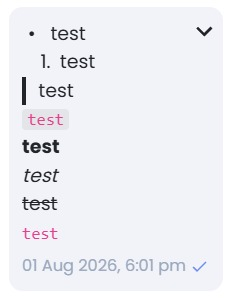
You can now use and view supported WhatsApp text formatting, such as bold and italic, directly in the Strive Inbox. 💬
What it means to you:
Previously, WhatsApp text formatting was not displayed properly in Strive. With this enhancement, formatted messages now appear more accurately, making conversations clearer and easier to read. 👀
How you can go about it:
Go to Inbox.
Click on a chat.
Enter your message using supported WhatsApp text formatting.
Send the message and view the formatting directly in the conversation.
No setup is required. ✅