Updated Contact Action Icons in Strive Go 📱💬
What's New:
We’ve updated the Contact module in Strive Go with improved contact action icons and navigation options 🎉
What it means to you:
You can now quickly choose how you want to interact with a contact—whether to open their inbox conversation, start a new chat, or continue chatting in WhatsApp. This makes communication faster and more flexible 🚀
With this update, you can:
✅ Redirect directly to the Inbox conversation based on the contact's latest channel
✅ Start a new chat through Strive Go or your device's Contacts app
✅ Open the chat directly in WhatsApp
✅ Access faster communication workflows from one place ⚡
How you can go about it:
Open the Contact module in Strive Go 📱
Click on the contact you want.
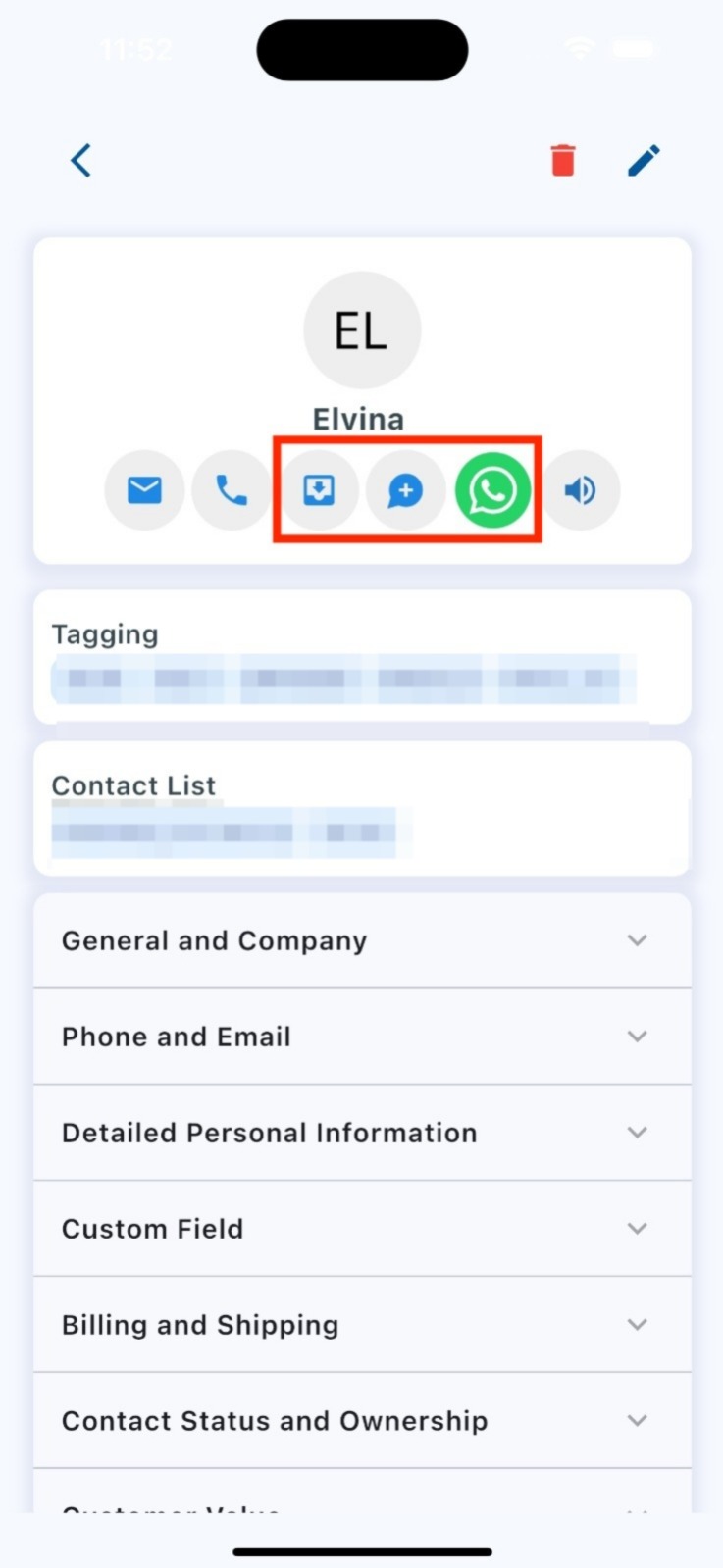
You will now see updated action icons:
First icon: Redirect to Inbox (based on the contact's latest contacted channel)
Second icon: Start a chat (available if the contact has a phone number)
Third icon: Open chat in WhatsApp (available if the contact has a phone number)
Select the action based on your preferred communication flow 🎯