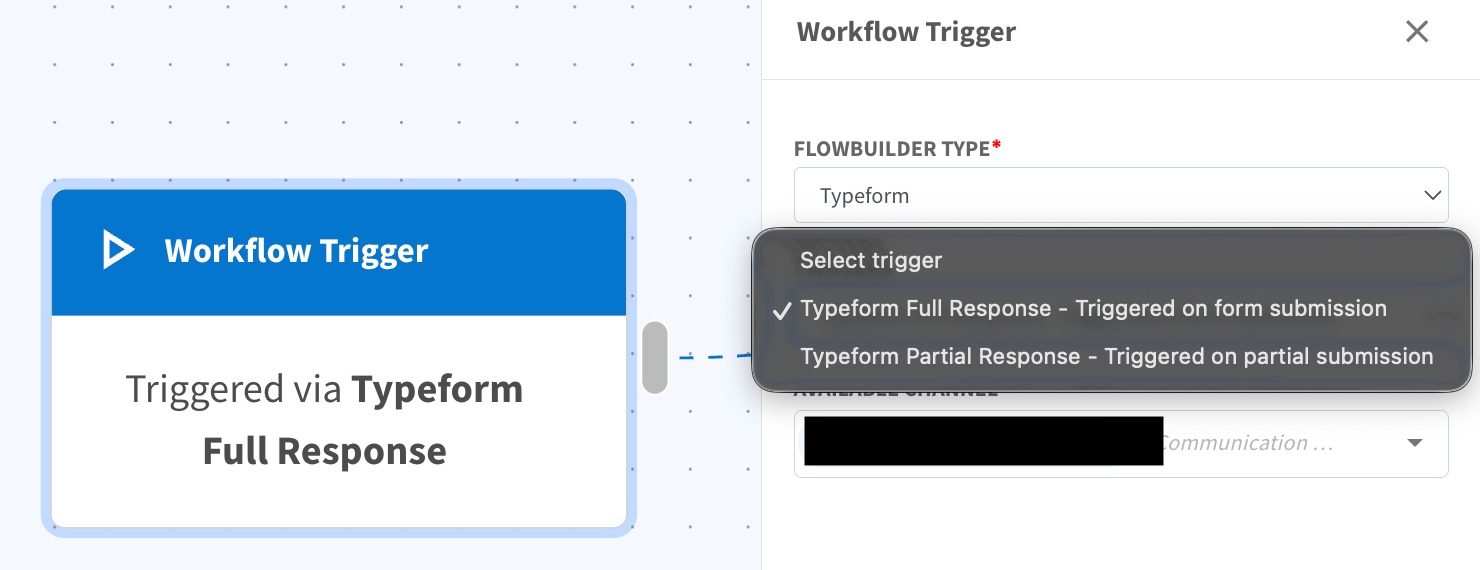
New Typeform Trigger in Flowbuilder 🌐
What's New:
We’ve introduced a new Typeform Trigger in Flowbuilder 🎉
What it means to you:
You can now directly use Typeform as a trigger in Flowbuilder to start automations based on form activity, giving you more powerful and flexible workflow automation ⚡
With this enhancement, you can:
✅ Trigger flows from Typeform submissions
✅ Choose between Full Response and Partial Response triggers
✅ Capture both completed and in-progress leads
✅ Build more advanced Typeform-based automations 🚀
How you can go about it:
Go to Account → Connections and connect your Typeform account.
Then go to Flowbuilder and create or edit a flow.
Select Typeform Trigger as your trigger type.
Choose your mode:
Full Response (trigger on form submission)
Partial Response (trigger on partial submission)
Configure your flow and activate it 🚀