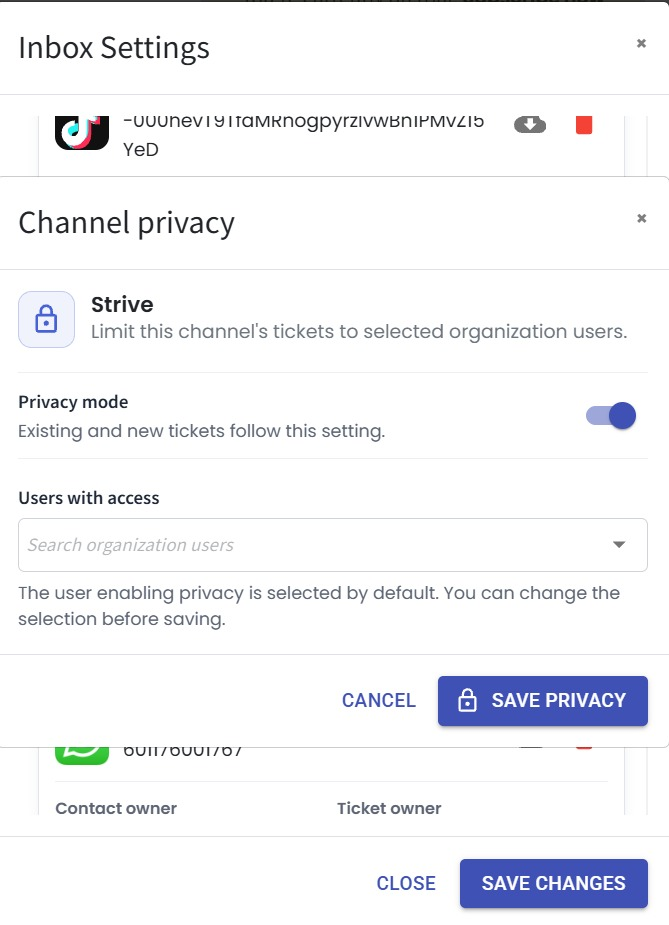
🔒 Control Inbox Access with Privacy Mode
What's New:
You can now enable Privacy Mode for individual channels in the Inbox. Once enabled, only selected users will be able to view tickets from that channel, giving you greater control over who can access sensitive conversations. 🔐
What it means to you:
Privacy Mode helps you restrict access to specific channels, ensuring that only authorised users can view their tickets. This is especially useful for managing confidential conversations, team-specific channels, or limiting visibility based on roles. 👥
How you can go about it:
Go to Inbox Module.
Click Inbox Settings.
Enable the Privacy Mode toggle for your desired channel.
Select the users who should have access to that channel's tickets.
Click Save Privacy to apply the changes. ✅