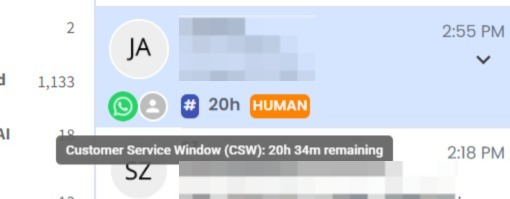
CSW Countdown Timer on Chat Preview ⏱️
What's New:
You can now see the CSW countdown timer directly in each chat preview within the Inbox. This allows you to check the remaining Customer Service Window (CSW) time for each contact without opening the conversation. ✔️
What it means to you:
You can quickly identify how much CSW time is remaining for each ticket directly from the conversation list, making it easier to manage and prioritize your chats. 🚀
How you can go about it:
Go to the Inbox.
Look at the chat preview for each ticket.
The remaining CSW time will be displayed directly in the chat preview, such as 20h.
Hover over the CSW timer to view the more detailed remaining time. ✨