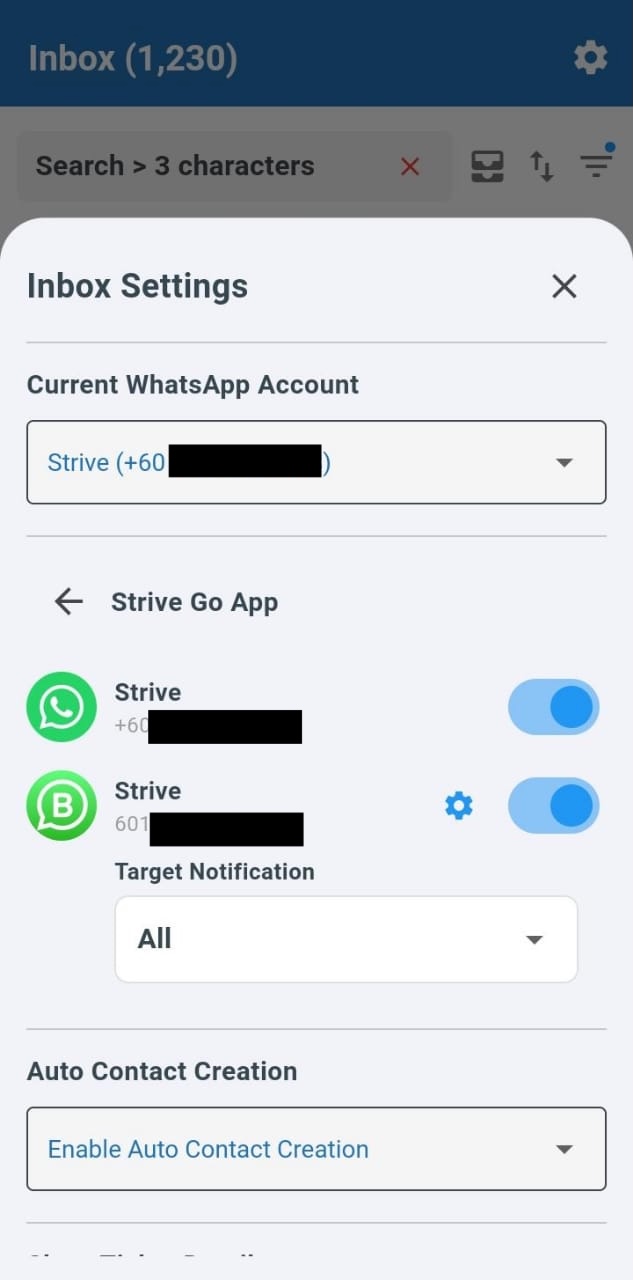
Customize Strive Go Notifications for Chats 🔔
What's New:
You can now choose how Strive Go notifies you when a new message comes into your Inbox. 💬
Instead of receiving notifications for every chat, you can decide whether to receive alerts for all chats, only group chats, or only individual chats. By default, notifications are turned on for all chat types.
If you prefer a more focused notification experience, you can adjust the setting using the steps below.
Steps:
Go to the Inbox module in Strive Go
Tap the gear icon on the top right
Tap the gear icon for Strive Go App
Tap the gear icon for the WA Personal channel
Tap the dropdown and select Group or Individual
Note: This notification setting is only available for the WA Personal channel and applies only to the Strive Go app. 📱
This helps you manage notifications better so you only receive alerts for the chats that matter most to you.