Refresh Facebook & Instagram Permissions 🔄
What's New:
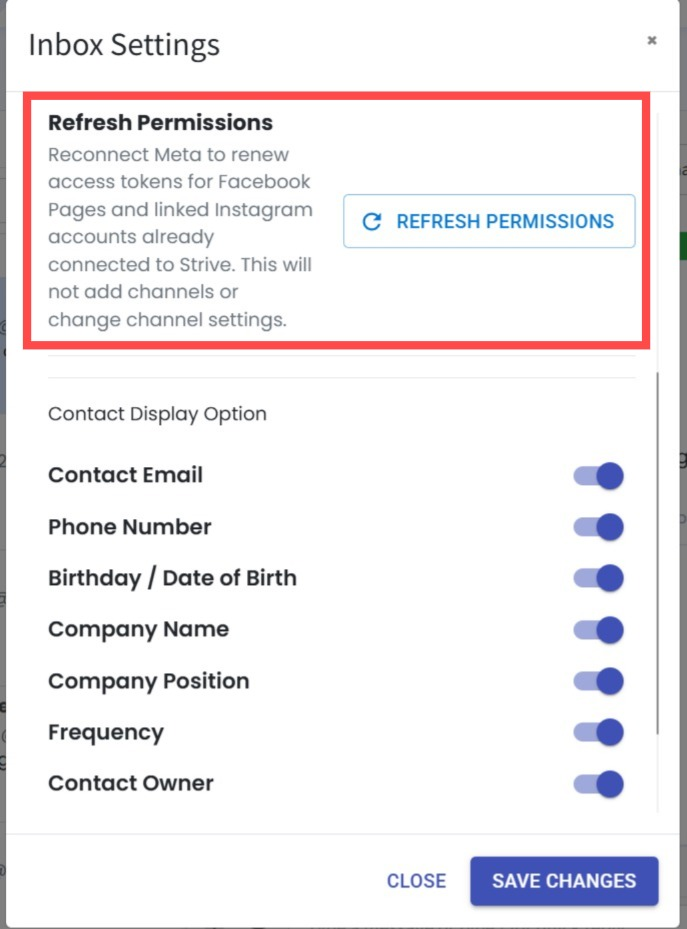
We’ve added a new Refresh Permissions button under Inbox > Inbox Settings for your connected Facebook Pages and Instagram accounts. 🔄
What it means to you:
If your Facebook or Instagram connection encounters a permission issue, you can now refresh the permissions directly without removing or reconnecting your existing channels. ✨
How you can go about it:
Go to Inbox > Inbox Settings and scroll down to find Refresh Permissions.
Click Refresh Permissions and follow the authorization steps to refresh access for your connected Facebook Pages and Instagram accounts. 🚀