AI Assist in Inbox Chat 🤖✨
What's New:
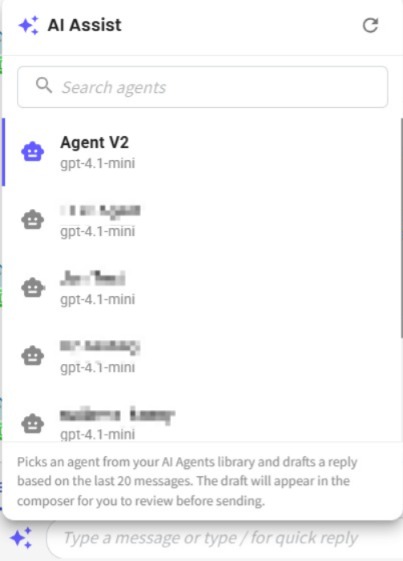
We've introduced AI Assist inside the Inbox chat composer to help you draft replies faster and smarter 🚀
What it means to you:
You can now generate AI-powered reply drafts directly in your inbox using your selected AI Agent 🌟
With AI Assist, you can:
✅ Select an AI Agent from your AI Agent library
✅ Generate replies based on the last 20 messages
✅ Speed up customer response time
✅ Maintain consistent and accurate communication
✅ Review and edit the AI-generated draft before sending 📝
How you can go about it:
Navigate to the Flowbuilder Module on the left sidebar.
Click on Agent then create your AI Agent.
Then go to the Inbox Module. Click on the AI Assist icon in the chat composer.
Pick your AI agent. The system will analyze the last 20 messages and generate a reply draft.
The draft will appear in the composer for you to review before sending 💬