Bulk Upload Files to Storage 📂🚀
What's New:
You can now upload multiple files at once in Storage Module using either drag-and-drop or file selection 🎉
What it means to you:
Managing files is now faster and more flexible. You can bulk upload multiple files in one go, and easily reuse or share media links with new copy options ⚡
With this enhancement, you can:
✅ Upload multiple files in a single action
✅ Drag and drop files directly into Storage Module
✅ Select multiple files via the upload file
✅ Copy media short tag for quick reuse
✅ Copy file URL for sharing or reference
✅ Manage files more efficiently without repetitive uploads 🚀
How you can go about it:
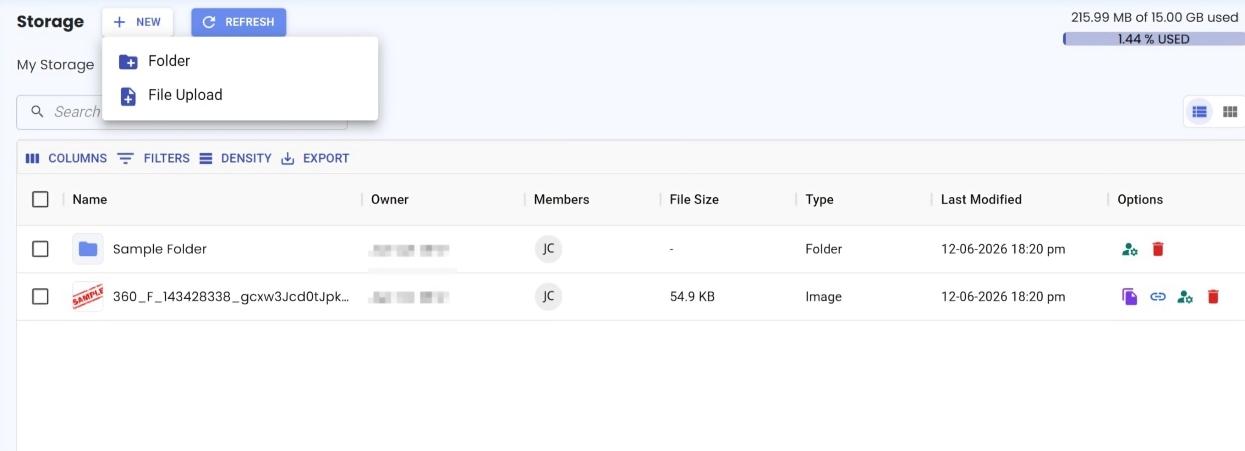
Go to the Storage module.
Click Add New on the top left to create a new folder or upload file.
Click File Upload, bulk select your files and upload them.
ORDrag and drop multiple files directly into Storage.
Once uploaded, you can click on the icons at the right side to:
Copy Media Short Tag
Copy File URL
Files will be uploaded and ready to use automatically 🎉