Flowbuilder Now Supports Segment Trigger 🚀
What's New:
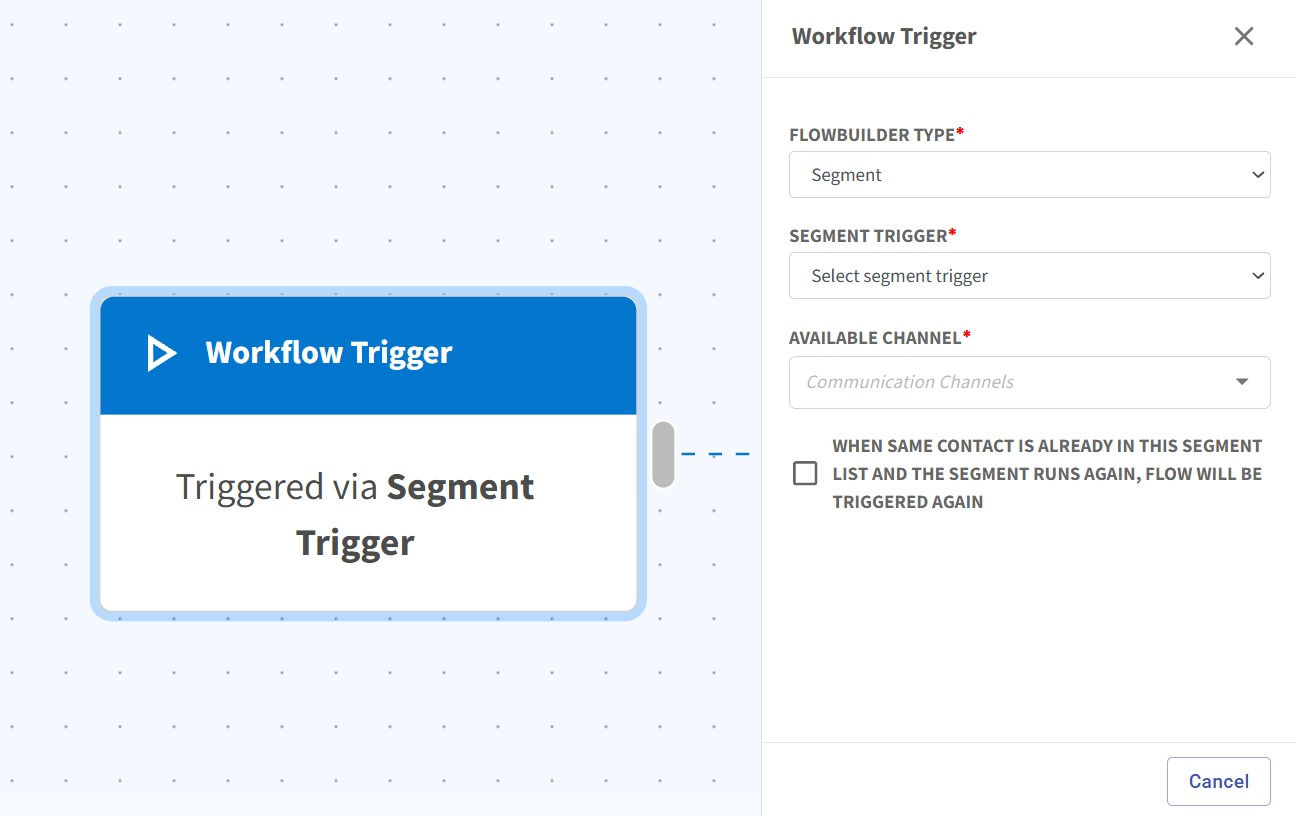
Flowbuilder now supports Segment Trigger, allowing contacts to be automatically enrolled into flows when they match segment conditions 🎉
What it means to you:
You can now trigger automations directly from contact segments, making it easier to build targeted and dynamic workflows without manual enrolment ⚡
With this enhancement, you can:
✅ Trigger flows based on segment conditions
✅ Automatically enroll contacts into flows
✅ Reduce manual steps in automation setup
✅ Build more dynamic audience-based workflows 🚀
How you can go about it:
1. Go to the Flowbuilder Module and create or edit a flow.
2. Click on the first node (Workflow Trigger).
3. Select Segment as the trigger type.
4. Choose the segment you want to use as the trigger.
5. Continue building and configuring your flow.
6. Save and publish your flow 🚀
Guide on how to segment your data :
https://scribehow.com/o/Fs8ozAjrTmmTVSASY4x3XQ/viewer/How_to_Segment_Your_Data__BfJf7lHTRaWxODTyAVyhJg